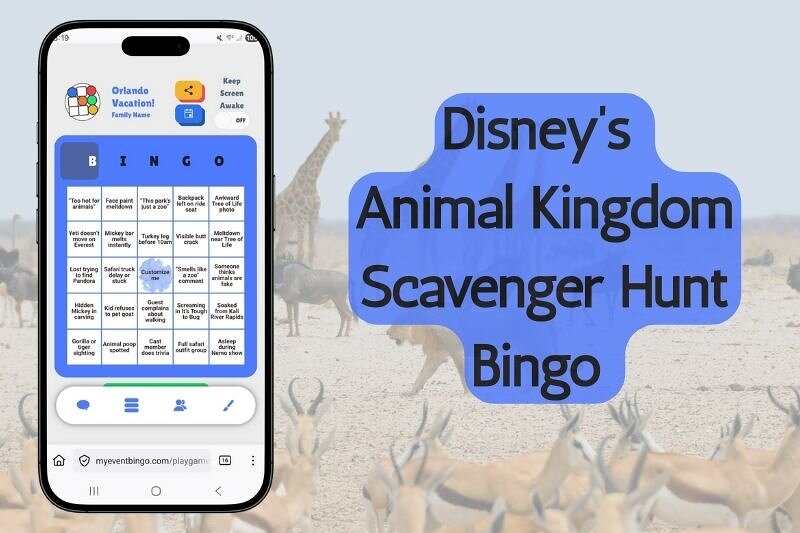
To play bingo online with friends, open the link somebody sent you, pick a name, and tap Join Game. Your card appears and you are in. No app, no account, nothing to print, and it runs in whatever browser is already on your phone.
The part that catches people out is what is on the card. These squares are not numbers.
How to join a bingo game in three taps
- Open the link. Tap it in the group chat, or point your phone camera at the QR code if the host has one up on a screen.
- Put a name on. The welcome card has a Playing as badge. Tap the name to type whatever you want the room to call you, and tap the disc beside it to pick an avatar. Skip both and everyone sees a default name and avatar, so customize it to reflect your personality.
- Tap JOIN GAME. Your board is dealt and you are in.
That really is the whole thing. Nothing to sign up for, no email address.
One thing to expect if you turn up early. The JOIN GAME button stays grayed out until the game's start time, and the card tells you when that is. There is no start button anywhere in the app, so the clock starts it rather than the host. Once the start time passes the JOIN button turns on. If you have been sitting on the page waiting, give it a moment, and reload the page once if it has not woken up.

This is not bingo with numbers
Nobody reads out B-14 here. There is no caller at all.
Every square on your card is something that is anticipated to happen at whatever your event or during your show. A wedding card has Someone cries during the speech and The DJ plays it anyway. A football card has Helmet comes off and A flag nobody in the room agrees with. A card for your sister's baby shower has Pacifiers.
You watch, and when one of your squares actually happens in front of you, you tap it. That is the game.
It runs alongside the reception or the Sunday game or the two hundred miles of motorway you were sitting through anyway.

What is on your screen
Your card is five squares by five. If the host left the free center square switched on, and most do, the middle one is already marked before you start.
Across the top are five letters, usually BINGO, though hosts can change them to anything five characters long. Those letters are your progress bar. They fill in one at a time as you get closer to a completed line, so you can see how close you are at a glance instead of counting squares.
The chat, the full list of squares in the game, the activity log and your options each get their own tab. On a phone they sit under your card; on a laptop they sit beside it. The log is timestamped in your own timezone and shows what is going on in the room. The player list is not one of the tabs. Tap the avatars along the top to open that.
The app also asks your phone to stay awake while you play, so the screen does not go dark on you halfway through. If you would rather it did not, there is a Keep Screen Awake switch in Options.

Your card is your own
Every player is dealt their own card, shuffled separately from the host's list of squares. If the host put more squares in the pool than fit on a card, then two people on the same sofa are not even hunting the same twenty-four things.
And your marks are yours. Tapping a square marks it on your board and nowhere else. Nobody else's tap fills in your squares, and you cannot see which squares anyone else has marked. If the gas station goes past while you are looking at your phone, you missed it.
The activity feed keeps everybody in the loop about which squares have been taken by other players. It says Ava took a square, not which square, so there is no reading the feed to work out what to watch for. Bingos are announced by name, because a bingo is the whole event.
Hosts can turn this around if they want to. There is a shared marking setting that shares the marks: you still get your own shuffled card, but any player's tap fills that square in for everyone who has it. It is switched off unless your host deliberately turned it on. So if you are wondering which version you are in, watch whether squares you did not tap start filling themselves in.
How you win, and who decides
A bingo is five in a row. Any row, any column, or either diagonal. Blackout is not a thing here.
You do not have to shout it, press anything, or prove it to anybody. The moment the fifth square in a line gets marked, the app has already worked it out. Your screen fills with YOU GOT BINGO! in your own color and a burst of confetti. Everyone else in the room gets a quieter version of the same panel reading your name and GOT BINGO, without the confetti.
The game does not necessarily stop there. The host sets how many people can win before it closes, and the default is five. So a first bingo usually means the race is on for the places behind it rather than the end of the night. If your host set it to one, then yes, the first bingo ends it.
Failing that, the game closes itself twenty-four hours after it started. Hosts can also pause it, which puts the boards away but leaves the chat and the square list up, and they can finish it early if the event finishes early.

Chat, and the leaderboard that shows who is close
Chat is built into the game on its own tab, and it is where most of the noise ends up. Messages carry your name, your avatar and your colour, so the room reads like a room rather than a log file.
There is also a player list, and this is the one people do not notice until somebody points it out. It ranks everyone by how far along they are, puts a crown on whoever is leading, and shows each player's progress towards a line. So you cannot see anybody's squares, but you can absolutely see that somebody is one away. That is the information that makes the last ten minutes tense.
Between the chat, the log and that leaderboard, a game played across four different houses still behaves like one room.
The live multiplayer bingo page puts all of it in one place: the tapping, the chat, the leaderboard and how winners are called.

Joining late, losing signal, coming back
You can join after a game has started. You get a full fresh card of your own plus the recent activity from the room, so you are behind on marks but you can see what you walked into.
If your phone sleeps, your signal drops, or you close the tab by accident, open the link again. You come back to the same game, on the same card, with your marks where you left them. Your place lives on the server rather than in the browser tab, so it survives a reboot and a flat battery.
Two limits worth knowing. You cannot join before the start time, and you cannot join a game that has already finished.
And if you open the same game somewhere else, on a second tab or a second device, the first one hands over. It shows a Disconnected card with a REFRESH TAB button, so tap that if you want to go back to playing on that screen instead.
Playing while everyone is on a video call
If your group is on a video call, keep the call and the board open side by side. Because there is no caller and nobody has to run the game from the front, the call is just faces. Nobody gets stuck presenting instead of playing.
On a laptop that is two windows. On a phone it is more comfortable to put the call on the laptop and the board on the phone, because the board wants the whole screen. Hosting one over a video call covers the setup properly.
Your name, your avatar, your colour
Name and avatar you set on the way in. Colour you set once you are inside, on the Options tab, under Your Color.
It is worth the ten seconds. Your colour marks your squares, tints your avatar, dots your line in the activity log and edges your chat messages, so picking one nobody else has makes the whole game easier to follow. All three can be changed mid-game if you decide you hate your choice.

Want to run one yourself?
Playing is the easy half. Running one is not much harder. You write the squares, the app deals everybody a card, and there is nothing to print and nobody to appoint as caller.
Making your own game goes through the builder screen by screen. And if you want the unglamorous truth about why some cards get played and others get glanced at once, it is all in the squares.
Questions players ask when they open the link
How do you play bingo online with friends?
One person makes a game and shares the link. Everyone else opens it, picks a name, taps Join Game and gets their own card. You all watch the same event and tap squares as things happen in front of you. Five in a row is a bingo.
Can I play bingo online with friends for free?
Yes. Free to play, no purchase necessary, no real-money wagering, and no prizes of monetary value.
Do I need an app or an account?
No to both. It runs in the browser your phone already has, and joining asks for a name, not an email address. Signing in is optional and only matters if you want your games to follow you between devices.
What is a bingo link game?
A bingo game you join by opening a link instead of being handed a paper card. The link is the entire invitation. It carries the game, deals you a card, and drops you into the same live game as everyone else who opened it.
Can other people see what I have marked?
Not by default. Your marks stay on your card. The room can see that you took a square and how close you are to a line, but not which squares you hold. A host can switch on shared marking, but that is off unless they choose it.
Can I play on my phone?
Yes, and most people do. Phone, tablet or laptop, anything with a browser works.